 Akhand Singh
Designing for the Unwatched · Part 1
The Missing Screen: What You Lose When Nobody Is Watching
Part 1 of 4 in Designing for the Unwatched
Most of the software I have worked on assumes a person is looking at it. Someone clicks, something spins, a toast appears, and if the result is wrong, the face of the person who clicked changes before they have finished reading. That feedback loop is so ordinary that we stopped counting it as a feature.
This series is about the opposite case. At Larkspur Bakery, an invented online bakery, the interesting work happens at 2 a.m. Orders get packed into a queue, refunds get evaluated, supplier restocks get placed, and the morning newsletter gets assembled. Nobody is there. A person shows up at 7:30 with coffee and has to find out what happened.
This is Part 1 of the series in Designing for the Unwatched. The question for the whole series is simple: what does an interface owe someone who was not there when the work happened?
Before I can answer it, I have to describe what disappears. That is this article.
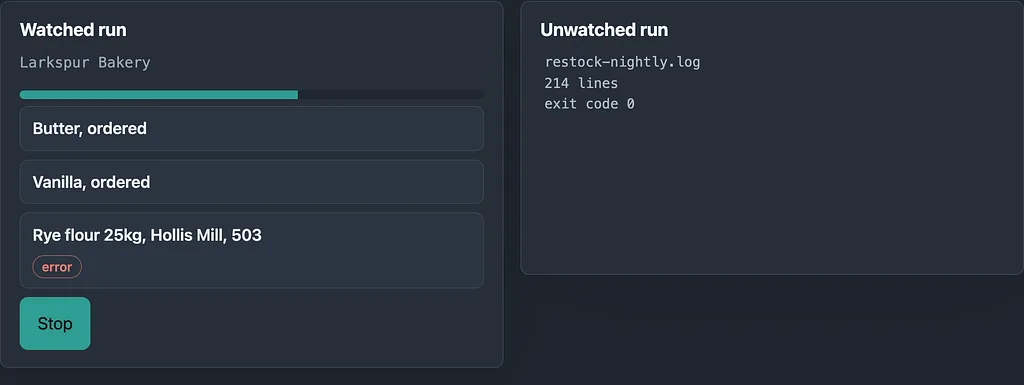
Side-by-side comparison of a live UI showing progress, inline errors, and a stop button versus an unwatched run producing only a 214-line log file with exit code 0.
What a Live Screen Gives You for Free
When a person watches a job run, the interface does at least five things without anyone designing them on purpose.
- Progress. You can see that it is moving, and roughly how far along it is. A job that takes eleven minutes instead of ninety seconds looks wrong before you can say why.
- Errors in context. The failure appears next to the thing that failed, while you are still looking at the thing. You do not have to reconstruct which supplier call produced which red line.
- Magnitude. A number on a screen sits beside other numbers. You see a vanilla order priced at three times last week’s and you flinch. The flinch is a cheap, fast anomaly detector, and it only works because the number was rendered where your eyes already were.
- The chance to say stop. This is the one we notice least. A running job has a window in which a human can interrupt it. Every confirmation dialog, every ‘Are you sure’, every cancel button is a small piece of that window.
- Implied scope. A live screen shows what is in front of you and implies nothing else is happening. You know the boundary of the work because you can see the edges of the screen.
An unwatched job loses all five at once. Not partially. The agent still does the work, but the window closes, the flinch has nowhere to happen, and the only artifact that survives is whatever the author of the job decided to write down at the time they wrote it.
That last clause is the whole problem. Logs are written by the person building the job, for the person debugging the job. The person reading at 7:30 is a different person with a different question.
The Demo: One Queue, Two Outputs
I built a small project to make this concrete, and you can build it in an afternoon. It is a toy nightly agent for Larkspur Bakery. It loads a made-up queue of fourteen items: customer orders, two refund requests, and a handful of supplier restocks. It processes them in order, then renders two outputs from the same run, side by side:
- A raw log dump, the kind most jobs leave behind.
- A structured morning report.
Both outputs come from one event stream, so neither knows anything the other does not. That constraint matters. It means any difference in usefulness comes from structure, not from hidden information.
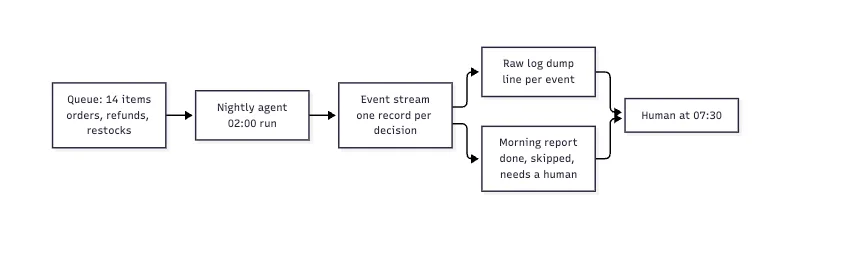
Architecture diagram showing a 14-item queue processed by a nightly agent into an event stream, then split into a raw log dump and a structured morning report for a human at 07:30.
The agent itself is boring on purpose. Each decision emits one typed event instead of a formatted string:
type Event = {
  at: string;            // ISO timestamp
  kind: 'restock' | 'refund' | 'order' | 'newsletter';
  subject: string;       // sku or order id
  outcome: 'done' | 'skipped' | 'failed' | 'held';
  reason?: string;
  detail: Record<string, number | string>;
};
The log renderer maps each event to a line. The report renderer groups them. Same data, two projections. Hold that thought, because it is the design move this whole article leans on.
A Night in the Log
Here is what the raw dump looks like for the restock portion of one run. The data is invented, including the supplier.
02:00:01 INFO job start restock-nightly v0.3 queue=14
02:00:02 INFO sku=BUT-SALT-5K stock=11 min=20 reorder qty=40 supplier=hollis-mill
02:00:02 INFO po created po=PO-7731 sku=BUT-SALT-5K qty=40 unit=6.20
02:00:04 INFO sku=VAN-MAD-1L stock=0 min=3 reorder qty=6 supplier=anselm-spice
02:00:04 INFO po created po=PO-7732 sku=VAN-MAD-1L qty=6 unit=54.00
02:00:06 INFO sku=RYE-FLR-25K stock=4 min=10 reorder qty=10 supplier=hollis-mill
02:00:09 WARN supplier=hollis-mill status=503 retry=3/3
02:00:09 WARN restock failed sku=RYE-FLR-25K
02:00:10 INFO refund order=L-20418 amount=212.00 limit=150.00
02:00:10 INFO refund order=L-20418 routed=review
02:00:12 INFO newsletter segment=weekend-bakers recipients=3182 queued
02:00:14 INFO job end ok processed=14 exit=0
Read it once as the author. Everything is there. You can reconstruct the night.
Now read it as someone who has four minutes before a delivery call. Three things happened that matter, and none of them is legible.
- The butter was probably a duplicate. The agent saw stock at 11 against a minimum of 20 and ordered 40. But PO-7729, placed the previous night, had not arrived yet. The agent computed need from on-hand stock, not from on-hand plus on-order. So the bakery now has 80 kilos of salted butter inbound for a minimum of 20. Every line about it says INFO.
- The vanilla price tripled. Last month’s unit price was 18.00. Tonight’s was 54.00. The agent’s guard was a per-line spending cap of 400, and 6 times 54 is 324. Under the cap, so it passed. The log prints the unit price, but nothing prints the previous one, so nobody flinches.
- The rye flour never got ordered. The supplier returned a 503 three times, and the agent gave up. That is a reasonable thing for an agent to do. What is not reasonable is that the bakery has four bags, sells roughly two a day, and now has about forty-eight hours before the Thursday sourdough run fails. The WARN line is line 7 of 11 in this excerpt. In a real log it would be line 140 of 214.
Then the last line: job end ok processed=14 exit=0.
Exit code 0 is the loudest sentence in the file, and it is a lie of omission. It says the process did not crash. A reader hears ‘the night went fine’. Those are different claims, and the gap between them is where an unwatched system does its damage.
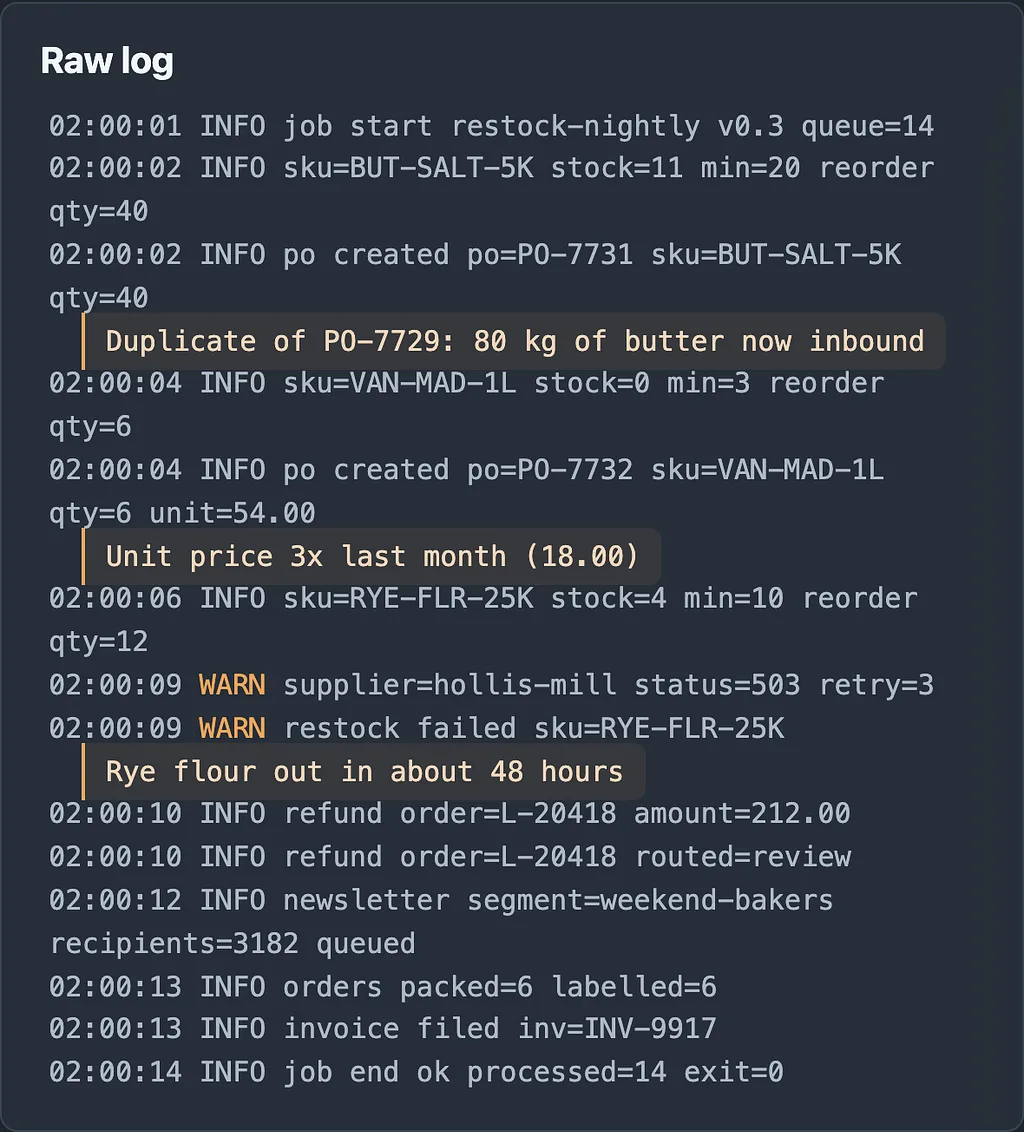
Diagram showing lines from Larkspur Bakery’s nightly restock log connected to annotations explaining real-world consequences: duplicate butter order, tripled vanilla price, and rye flour running out.
What the Log Cannot Tell You
I want to be precise about why the log fails, because the fix is not ‘log more’.
The log is chronological. The reader’s question is not chronological. At 7:30 nobody asks what happened at 02:00:06. They ask what do I need to do before 9:00. Chronology is the author’s order. Priority is the reader’s order.
- The log has no concept of a skipped action. A skip is an absence, and absences do not produce lines unless someone explicitly writes one. The refund for order L-20418 appears because the code path logged a routing decision. The refund that was never evaluated because the queue item was malformed? That does not appear at all. The reader cannot distinguish ‘nothing needed doing’ from ‘something needed doing and I never saw it’.
- The log carries no consequence. ‘restock failed’ is a fact. ‘Rye flour runs out Wednesday night’ is a consequence. The agent had the numbers to compute the second one and did not, because nobody asked it to.
- The log has no addressee. It never says this one is for a human. It does not know there is a human.
- And the log is uniformly flat. Every line has the same weight except for a three or four character level token that, in practice, readers learn to ignore. If you have ever ignored a WARN, you have done what everyone does.
I will take a position here. Adding structured fields, JSON lines, trace IDs and dashboards is good engineering and it does not solve this. Those tools help the person who already knows what to look for. The absent user does not know what to look for, and the interface has to tell them.
That is a design problem, not an observability problem.
The Report Is the Only Screen
So treat the report as what it is: the only screen this person will ever get for last night’s work. It has to do the jobs the live screen did for free, in a static, scannable form. In the demo, the report renderer produces exactly three sections, in this fixed order.
- What I did. Actions that completed and need no response. This section should be short and boring, and it should be countable. ‘Placed 2 purchase orders, queued 1 newsletter to 3,182 recipients, routed 1 refund to review.’ A reader wants to be able to say yes, that is about what I expected.
- What I skipped. Every skip carries a reason and a consequence. This is the section the log does not have, and it is the most important one to get right.
- What needs a human. Items where the agent stopped, or where it acted but a person should check. Each one has a deadline and a default.
The report is built from the same events. Here is the shape the renderer works with:
type Skip = {
  subject: string;
  reason: string;       // why the agent did not act
  consequence: string;  // what happens if nobody acts
  nextChance?: string;  // when the agent will try again, if ever
};

type Ask = {
  subject: string;
  question: string;     // phrased as a decision, not a status
  deadline: string;     // when waiting starts to cost something
  ifSilent: string;     // what happens if the human does nothing
};
Two fields do the heavy lifting: consequence and ifSilent. They force the author of the job to say what a missed item costs, at design time, while thinking clearly, instead of leaving the reader to infer it at 7:30. If you cannot fill those two fields in, you do not yet understand your own job well enough to run it unwatched.
Here is how last night comes out:
Larkspur nightly run, Tue 02:00 to 02:00:14
14 items. 9 done, 2 skipped, 3 need you.
NEEDS A HUMAN
1. Rye flour 25kg (RYE-FLR-25K): not ordered. Hollis Mill returned 503 x3.
   Stock 4 bags, about 2 per day. Runs out Wed night.
   Decide by 12:00 today: reorder from Dunmore Grain, or wait for Hollis Mill.
   If you do nothing: agent retries at 02:00, Sourdough run Thu is at risk.
2. Vanilla (VAN-MAD-1L): PO-7732 placed at 54.00/L, last price 18.00/L (3.0x).
   Total 324.00, under the 400 line cap, so I did not stop.
   Decide by 10:00: confirm or cancel while the PO is still unsent.
   If you do nothing: PO is sent to Anselm Spice at 10:00.
3. Refund L-20418, 212.00: over the 150.00 limit. Held for review.
   If you do nothing: customer is not notified; no deadline set.
SKIPPED
- Salted butter: not skipped, but PO-7731 (40 kg) overlaps PO-7729 (40 kg, due Thu).
  On-order stock was not counted. See note.
- Order L-20431: malformed address. Not packed. Customer not yet contacted.
DONE
- 2 purchase orders placed (PO-7731, PO-7732)
- 1 newsletter queued: weekend-bakers, 3,182 recipients
- 6 orders packed and labelled
Notice what changed. The vanilla item now carries the previous price and a ratio, which restores the flinch. The rye flour item carries a consequence and a clock. The duplicate butter order, which the agent could not have flagged by itself, is flagged because the report renderer compares each new PO against open POs. That is a few lines of code that live in the rendering layer, not the agent, and they surface a bug the agent itself does not know it has.
And the report would be honest even if it were wrong. The line about the vanilla cap says in plain words that the agent acted because it was under a threshold. A person can disagree with the threshold. They cannot disagree with a line that says only ‘po created’.
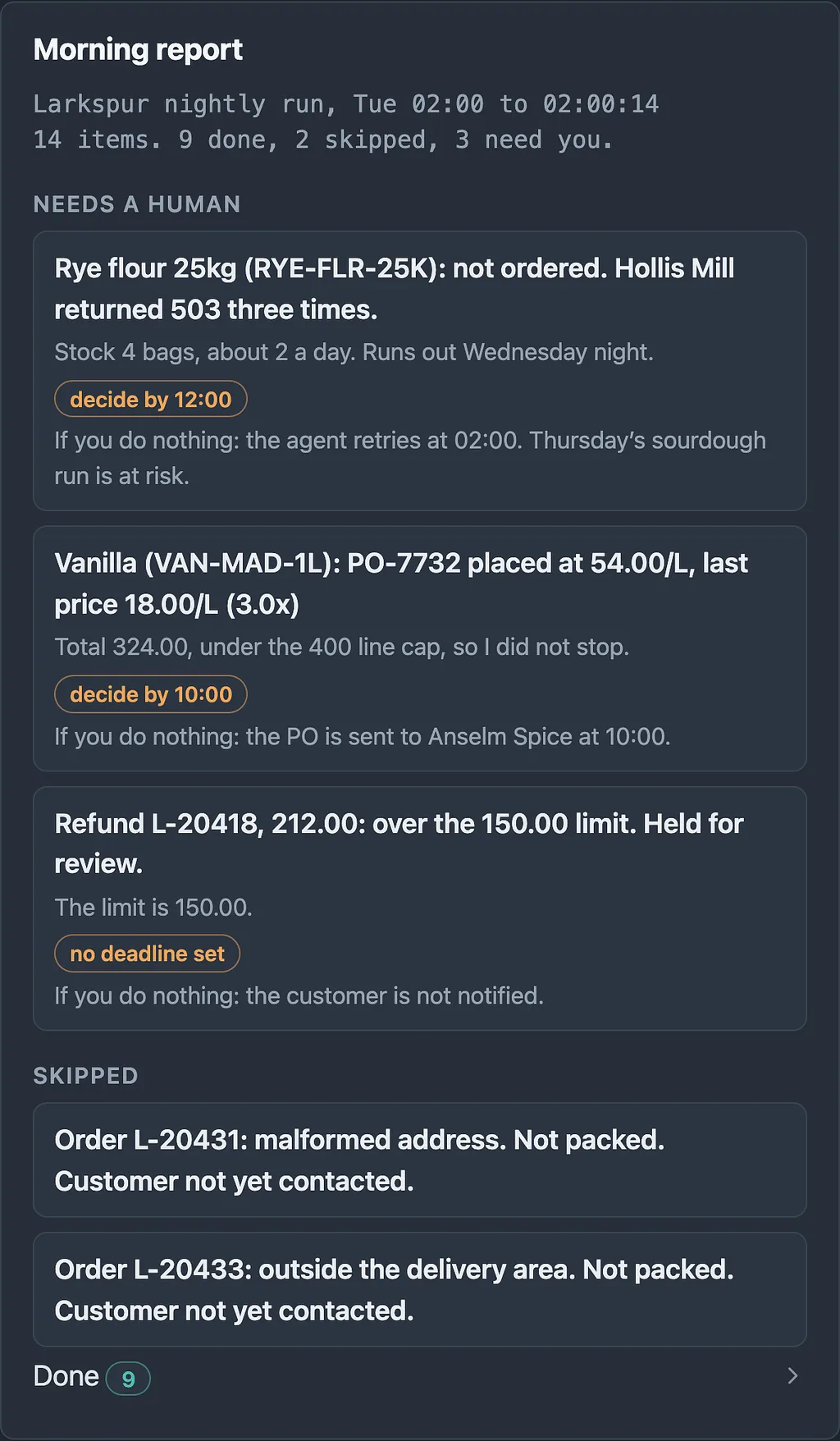
Mockup of an action-oriented morning report interface showing 14 items categorized into ‘Needs a human’ with deadlines, ‘Skipped’ actions, and a collapsed ‘Done’ section.
Why the Order of Sections Matters
I put ‘needs a human’ first, above ‘done’. That feels backwards the first time, because the natural story of a night is what happened, then what went wrong. But the reader’s job is to act, and the first screenful of anything is the only part guaranteed to be read.
If the report opens with a long list of successes, you train the reader to skim, and skimming is exactly the behavior that misses the one line that mattered. Make the happy path collapsed and countable. Make the unhappy path expanded and specific. If a night has zero items that need a human, the report should say so in one line and stop. A short report is a feature. It tells the reader their absence cost nothing.
There is also a calibration effect over time. A report that cries wolf on every run gets ignored within two weeks. A report that is quiet on quiet nights and specific on bad ones earns the right to be believed. I will come back to this in the part on interruption, because the line between ‘put it in the morning report’ and ‘wake someone up’ is its own design problem.
What the Report Still Cannot Do
I do not want to oversell the morning report. It is the minimum, not the answer.
It arrives after the work is done. Everything in it has already happened, except the items still in a held state. The vanilla PO is cancellable only because the demo deliberately delays sending it until 10:00. That delay is a design decision about the work, not about the report. If the agent had sent the PO at 02:00:04, the report would be an accurate obituary.
It also assumes someone reads it. A structured report in an inbox nobody opens is just a better-formatted log.
And it cannot replace a decision about what the agent should have been allowed to do in the first place. A perfect report of an action you would never have approved is still a report of an action you would never have approved. The butter did not need a better summary. It needed the agent to count on-order stock.
These limits are why a report alone is not enough, and why this is a series.
Four Debts
Here is the framework I will use for the next three parts. An interface for unwatched work owes the absent user four things. I think of them as debts because they accrue silently while nobody is looking, and because the failure shows up later, at the worst time, as interest.
- The debt of approval. Before the work runs, someone has to decide what the agent may do without asking. A per-line cap of 400 is an approval policy, whether or not anyone wrote it down that way. Part 2 is about making those policies explicit, tiered and legible, so that ‘under the cap’ is a decision a human made and not an accident of a config file.
- The debt of status. While and after the work runs, the system owes a truthful account of where it stands. Not an exit code. A statement of what is done, what is pending and what is stuck. The morning report is the first draft of this.
- The debt of interruption. Some things cannot wait for 7:30. The system owes the human a rule for when to speak up, and the discipline not to speak up otherwise. Status and interruption belong together because they are two ends of the same dial, and I will treat them in Part 3.
- The debt of trust and undo. Eventually the agent will do something wrong with full confidence. The interface owes a way to see exactly what it did, reverse what can be reversed, and be honest about what cannot. A purchase order that has been emailed to a supplier is not the same kind of thing as a draft.
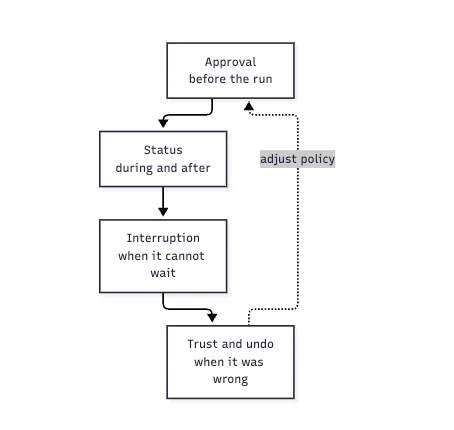
Flowchart of the four debts of unwatched work: Approval, Status, Interruption, and Trust and Undo, with a feedback loop from Undo back to Approval labeled ‘adjust policy’.
The loop at the bottom is not decoration. What you learn from undoing a mistake changes what you approve next time. The four debts are one system, and the missing screen is what makes all of them invisible at once.
Build It and Compare
If you want to feel this rather than take my word for it, build the demo. It is small: a fixture file of fourteen queue items, an agent loop that emits typed events, and two renderers. Seed the data so that three things go wrong: a duplicate PO, a price jump under the cap, and a supplier 503. Then run it, open the log, and give yourself thirty seconds to answer three questions: what is at risk, by when, and what do I decide? Do the same with the report.
I suspect you will answer all three from the report and, from the log, you will answer one or two and feel unsure about the rest. That unsureness is the cost of the missing screen, and it is the cost your own users pay every morning.
One more observation from building it. The hardest part was not the rendering. It was filling in consequence and ifSilent for each kind of event. I kept discovering jobs whose failure modes I had not thought through. The report did not just inform the reader. It audited the author.
Actionable takeaway: Take one job in your own system that runs while nobody is watching. Write down, for each of its outcomes, the consequence of a miss and what happens if the human does nothing. If you cannot write those two lines, the job is not ready to run unwatched. If you can, put them at the top of whatever it leaves behind, and let exit code 0 mean only that the process did not crash.
Next in the series, Part 2 takes up the approval gate: how to decide what an agent may do without asking, and how to make that decision visible instead of buried in a threshold.
Which of your overnight jobs would you least want to read the log of at 7:30 on a bad day?