 Akhand Singh
Building Scalable UI Architectures · Part 3
RUM, Observability & User Insights in a Modular Frontend
In Part 1 and Part 2, we laid the groundwork for scalable frontend architectures using modular monorepo patterns. Now, we tackle a crucial piece often overlooked: observability and user insights.
A scalable frontend isn’t complete without understanding how real users experience your app, where errors occur, and how features are adopted. This article explains how to build a modular, vendor-agnostic observability layer that includes Real User Monitoring (RUM), error tracking with session replay, feature flags, user analytics, product adoption, feedback loops, and privacy controls.
Whether you are an engineer, product manager, or team lead, this guide provides practical patterns to embed observability deeply into your scalable frontend architecture.
Modular Layer Recap
To scale observability effectively, we isolate it in a dedicated /packages/observability package within our monorepo:
packages/
  sdk/
  api/
  hooks/
  context/
  utils/
  types/
  styles/
  test/
  observability/   → observability layer here

apps/
  web-app/
    app/
    domain/
      map/
    context/
    utils/
    types/
    routes/
    test/
  admin-panel/
This package wraps vendor SDKs and instrumentation, offers simple, consistent APIs, and enforces metadata standards and privacy across all telemetry events.
RUM (Real User Monitoring)
RUM captures how your app performs in real user environments, measuring metrics including Core Web Vitals — Largest Contentful Paint (LCP), First Input Delay (FID), Cumulative Layout Shift (CLS) — along with resource load times and interaction latencies.
Synthetic tests simulate ideal conditions, but RUM reveals the true user experience impacted by network variability, device capabilities, and user behavior. These insights are invaluable for:
- Quickly spotting performance regressions affecting real users
- Prioritizing fixes based on actual user impact
- Validating performance improvements after releases
For example, if a new feature flag enables a heavy dashboard widget, causing slower LCP on mobile devices, RUM data combined with flag context helps you target fixes precisely.
To maintain flexibility, abstract your RUM tools behind a modular wrapper. This lets you switch or combine providers with minimal app changes, choosing from:
- Embrace.io — specialized RUM with rich session and device context
- OpenTelemetry — open-source, vendor-neutral distributed tracing
- Custom or proprietary tools
Your wrapper should inject shared session metadata and feature flags to correlate RUM data with errors and experiments.
// packages/observability/rum.ts
import { getSessionContext } from './context';

let embrace: any;

export async function initRUM() {
  const ctx = getSessionContext();

  const module = await import('@embrace/web-core');
  embrace = module.default;

  embrace.init({
    appId: process.env.EMBRACE_APP_ID!,
    sessionId: ctx.sessionId,
    userId: ctx.userId,
    featureFlags: ctx.featureFlags,
  });

  console.log('[RUM] Embrace.io initialized');
}
Error Tracking & Session Replay
Errors happen. The difference between a long bug hunt and a quick fix is knowing exactly what the user experienced leading up to the failure.
Session replay provides a video-like record of user actions and UI state, while error tracking captures stack traces and metadata. Together, they give you rich context to diagnose and resolve issues rapidly.
Key benefits for your team include:
- See the precise user interactions, environment, and device state when errors occur
- Correlate errors with feature flags and user segments to prioritize impactful fixes
- Reduce mean time to resolution and improve product stability
To maximize overage and maintain flexibility, build a modular wrapper around multiple providers that leverage their unique strengths and reduce blind spots:
- Use PostHog & Embrace.io for session replay plus enhanced error context
- Integrate Sentry for robust error telemetry and alerting
- Incorporate additional custom or vendor solutions as your needs evolve
This unified wrapper enriches every error event with consistent metadata, enabling seamless cross-tool correlation and streamlined analysis across your observability stack.
// packages/observability/errors.ts

let embrace: any = null;
let posthog: any = null;
let sentry: any = null;

export async function initErrorTracking() {
  const ctx = getSessionContext();

  try {
    const embraceModule = await import('@embrace/web-core');
    embrace = embraceModule.default;
    embrace.init({ appId: process.env.EMBRACE_APP_ID!, sessionId: ctx.sessionId, userId: ctx.userId, featureFlags: ctx.featureFlags });
  } catch (e) {
    console.warn('Embrace.io init failed', e);
  }

  try {
    const ph = await import('posthog-js');
    posthog = ph;
    posthog.init(process.env.POSTHOG_API_KEY!, { api_host: process.env.POSTHOG_API_HOST!, autocapture: false, disable_session_recording: true });
  } catch (e) {
    console.warn('PostHog init failed', e);
  }

  try {
    const Sentry = await import('@sentry/browser');
    sentry = Sentry;
    sentry.init({ dsn: process.env.SENTRY_DSN!, environment: process.env.NODE_ENV });
  } catch (e) {
    console.warn('Sentry init failed', e);
  }

  console.log('[ErrorTracking] Initialized providers');
}

export function captureError({ error, context = {} }: { error: Error; context?: Record<string, any> }) {
  if (embrace) embrace.captureException(error);
  if (posthog) posthog.capture('frontend_error', { errorMessage: error.message, stack: error.stack, ...context, featureFlags: JSON.stringify(getSessionContext().featureFlags) });
  if (sentry) sentry.captureException(error);
}
Feature Flags & Experimentation
Feature flags enable safe rollouts, canary releases, and A/B testing, allowing teams to iterate rapidly while minimizing risk. Flags help you:
- Deploy unfinished or experimental features to small user subsets
- Experiment and validate feature impact before full rollout
- Quickly roll back problematic features without new deployments
Abstracting feature flag providers such as PostHog, LaunchDarkly, or ConfigCat behind a unified API gives you centralized control to:
- Retrieve flag states and variants consistently across your app
- Inject flag context into observability events, enabling seamless correlation between feature exposure and system behavior
// packages/observability/flags.ts

let flags: Record<string, boolean> = {};
let client: any;

export async function initFeatureFlags(userId: string) {
  const ph = await import('posthog-js');
  client = ph;
  client.init(process.env.POSTHOG_API_KEY!);
  flags = await client.getFeatureFlags();
}

export function getFlag(key: string) {
  return flags[key] ?? false;
}
User Behaviour Analytics
Analytics provide a window into how users engage with your app, where they abandon flows, and how new features impact retention and conversion. These insights fuel data-driven product decisions and continuous improvement by helping teams to:
- Measure feature adoption and overall user engagement
- Identify usage patterns and pain points within user flows
- Understand drop-offs and optimize conversion funnels
By abstracting analytics providers like Pendo, PostHog, Mixpanel, or Amplitude behind simple, consistent APIs, you gain the flexibility to track page views, custom events, and funnel steps without coupling your app to any single tool. This modularity makes it easy to swap or combine analytics solutions as your needs evolve.
// packages/observability/analytics.ts

let analyticsClient: any;

export async function initAnalytics() {
  const pendo = await import('pendo-js');
  analyticsClient = pendo;
  analyticsClient.initialize({ visitor: { id: 'user123' }, account: { id: 'acct123' } });
}

export function trackPageView(name: string) {
  analyticsClient?.trackPageView({ name });
}

export function trackEvent(name: string, props: Record<string, any> = {}) {
  analyticsClient?.track(name, props);
}
Product Adoption & Retention Tracking
Tracking when and how users adopt features provides valuable insights that inform product roadmap prioritization and retention strategies. Since not all users are exposed to every feature, combining adoption metrics with feature flag states ensures your analysis is accurate and meaningful.
Key benefits include:
- Identify successful features early
- Measure sustained engagement over time
- Segment users by adoption and usage for personalized experiences
// packages/observability/adoption.ts
import { trackEvent } from './analytics';
import { getFlag } from './flags';

export function trackFeatureAdoption(featureKey: string) {
  if (getFlag(featureKey)) {
    trackEvent('feature_adoption', { feature: featureKey, timestamp: Date.now() });
  }
}
User Feedback Loops
Telemetry delivers quantitative data, while user feedback adds qualitative depth — surfacing frustrations, feature requests, and direct validation from your users. The key benefits of integrating user feedback into your application include:
- Detect usability issues early before they become widespread problems
- Prioritize feature requests based on real user input
- Build trust by providing transparent and accessible communication channels
By abstracting feedback tools such as UserBack, Hotjar, or custom solutions behind a unified API, you ensure feedback events include vital session and feature flag context, enriching your insights and enabling better correlation with other telemetry data.
// packages/observability/feedback.ts

let userback: any;

export async function initFeedback() {
  userback = await import('@userback/browser');
  userback.init({ token: process.env.USERBACK_TOKEN });
}

export function showFeedbackWidget() {
  userback?.open();
}
Privacy, Sampling & Performance
Collecting user data entails a significant responsibility. It is essential to uphold privacy compliance, such as adhering to GDPR and CCPA regulations, while also respecting user consent. Doing so is crucial for maintaining trust and ensuring a high-quality app experience. Additionally, it is important to minimize any performance impact that telemetry may introduce.
Best practices include:
- Sanitize and scrub personally identifiable information (PII) before sending any telemetry data.
- Fully honor user consent preferences and opt-out mechanisms in line with privacy regulations.
- Implement intelligent sampling on high-volume events to reduce data noise and control costs.
- Use batching and throttling techniques for telemetry transmissions to prevent UI lag and avoid sudden network spikes.
// packages/observability/utils.ts

export function sanitizePayload(payload: Record<string, any>) {
  const sanitized = { ...payload };
  if (sanitized.email) sanitized.email = hash(sanitized.email);
  if (sanitized.phone) sanitized.phone = 'REDACTED';
  return sanitized;
}
Cross-Tool Correlation & End-to-End Visibility
One of the greatest advantages of a modular observability layer is the ability to correlate data across multiple tools by sharing consistent identifiers, such as sessionId, userId, and active feature flags.
This capability enables you to link:
- RUM-detected performance issues with specific frontend errors
- Errors in the state of feature flags and impacted user segments
- Product adoption signals to qualitative user feedback
Combined with backend tracing (e.g., OpenTelemetry on APIs), this creates true end-to-end visibility for comprehensive debugging and data-driven product insights.
Final Thoughts
Building a modular, vendor-agnostic observability layer empowers your frontend teams to:
- Understand real user experience with RUM
- Quickly detect and reproduce errors via session replay
- Safely roll out features with robust feature flagging
- Analyze user behavior and adoption comprehensively
- Capture direct user feedback
- Ensure privacy and maintain app performance
Abstracting diverse telemetry providers behind unified, consistent wrappers gives you the flexibility, maintainability, and confidence required to scale your frontend architecture reliably and responsibly.
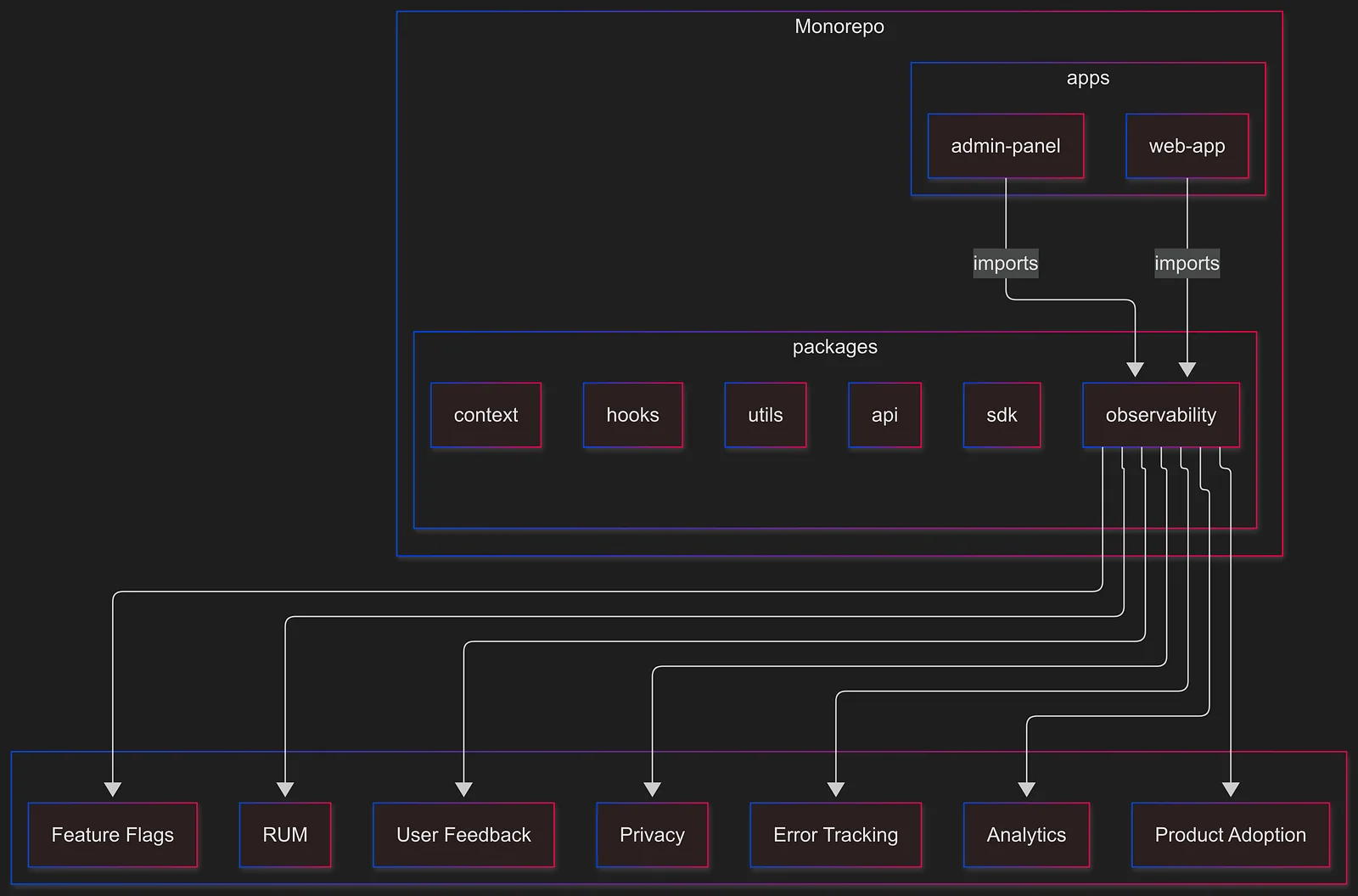
This architecture reflects how I approach building frontend systems that are modular, maintainable, and scalable across teams. While I’ve applied similar ideas in previous roles, I’m continuing to evolve this model as I help shape new interfaces at Causely, a platform focused on uncovering root causes in complex systems.
If you’re exploring ways to organize your frontend layers more intentionally, or thinking about design systems and developer experience, I’d love to connect.