 Akhand Singh
Building Scalable UI Architectures · Part 5
Performance as a Product and Architecture Concern

In the earlier parts of this series, I focused on boundaries, modularity, observability, and design systems. Those are all essential. But there is another area that every product team eventually runs into, whether they plan for it or not: performance.
Frontend performance is often treated as a late-stage optimization problem. Teams ship features, the UI grows, the bundle grows, interactions slow down, and then performance becomes a cleanup task.
In my experience, that framing is too narrow.
Performance is not just an optimization topic. It is an architecture topic.
The way we split code, structure domains, load data, compose components, manage state, and render heavy views all shape how the product feels to users long before anyone opens a profiler. A product can have a clean design system, strong modularity, and solid observability, but if interactions feel sluggish or screens take too long to stabilize, users still experience the system as slow.
That is why I think of performance as both a product concern and an architecture concern. It affects usability, trust, and focus. And the decisions that shape it usually happen much earlier than teams expect.
In this post, I want to walk through how I think about performance inside scalable frontend architectures, how architecture choices influence it, and the practical patterns that have helped me keep performance from becoming a reactive firefight.
Performance Begins with Boundaries
One of the clearest lessons I have learned is that performance problems rarely begin with a single large component. They usually begin with weak boundaries.
When a codebase lacks clear architectural boundaries, performance issues spread more easily:
- Features pull in more dependencies than they need
- Shared modules become heavier over time
- Route bundles grow unpredictably
- Domain code leaks into places it should not
- Rendering work expands because too many components are connected to the same state changes
A layered architecture helps performance because it limits blast radius.
If shared UI remains presentational, if domain code stays close to product workflows, and if data access stays typed and intentional, then performance tuning becomes more local and more understandable. You can reason about where the cost is coming from.
For example, in a modular frontend, it becomes easier to ask:
- Is this route loading too much upfront?
- Is this graph view pulling a heavy visualization dependency too early?
- Is this domain package causing too many rerenders?
- Is this table expensive because of the dataset or because of component composition?
Those are architecture questions as much as they are runtime questions.
Performance is a Product Experience, Not Just a Metric
It is easy to reduce frontend performance to Lighthouse scores or Web Vitals alone. Those are useful signals, but users do not experience a product as a spreadsheet of metrics. They experience it as responsiveness.
They notice:
- Whether filters update without friction
- Whether graphs and tables settle quickly
- Whether search feels fluid
- Whether a modal opens instantly or stutters
- Whether the page remains stable while data streams in
- Whether dense workflows feel calm or exhausting
In data-heavy products especially, perceived speed matters a lot. A system can technically finish loading, but still feel slow because the UI is visually unstable, the interaction model is noisy, or too much content shifts as data arrives.
That is why performance work should be tied to actual workflows, not abstract scoring alone.
If a product has investigative workflows, dashboards, large topology maps, deep filters, panels, overlays, and data-rich tables, then performance goals should reflect those realities.
A scalable frontend should not only render correctly. It should support concentration under load.
Measure Before You Optimize
One of the fastest ways to waste time is to optimize based on instinct alone.
I do not mean that intuition is useless. Experienced engineers often have good instincts about likely bottlenecks. But performance work becomes much more effective when teams can confirm what is actually expensive.
In a modern frontend stack, that usually means combining lab analysis with product telemetry:
- Bundle analysis for dependency and chunk visibility
- React profiling for render hotspots
- Browser performance tools for scripting, layout, and paint costs
- RUM or session telemetry for real-user signals
- Targeted instrumentation for workflow-specific timing
This is where having observability from Part 3 becomes very useful. When Datadog RUM, PostHog, or other telemetry exists in the product, performance stops being guesswork. It becomes something teams can observe in real usage, not only in local benchmarks.
In your own stack, a very practical example is bundle visibility during development:
{
  "scripts": {
    "analyze": "npx vite-bundle-visualizer",
    "audit:pkgsize": "npx pkg-size",
    "audit:npmgraph": "npx npmgraph ./ --open"
  }
}
This kind of tooling helps answer simple but important questions:
- Which dependencies are inflating route bundles?
- Where are heavy charting or graph libraries being pulled in?
- Which shared packages are dragging unrelated code into more screens than expected?
- Are we paying the cost of a tool globally when only one domain really needs it?
That visibility matters because a lot of frontend performance problems begin with dependency shape, not rendering tricks.
Bundle Size is an Architectural Signal
I think of bundle size as a signal of architectural intent.
A large bundle is not automatically wrong. Some products genuinely need heavy capabilities. But when bundles grow in ways that do not match user workflows, that usually points to a structural issue.
For example, if an investigative graph screen uses libraries like @xyflow/react, elkjs, charting packages, or syntax/highlighting utilities, that does not mean the homepage or admin settings should pay for all of them upfront.
A scalable architecture should make it easier to isolate that weight.
With Vite and modern route-level composition, this often means being disciplined about lazy loading and import boundaries:
import { lazy, Suspense } from 'react';

const GraphView = lazy(() => import('./graphView.component'));

export function GraphRoute() {
  return (
    <Suspense fallback={<GraphSkeleton />}>
      <GraphView />
    </Suspense>
  );
}
This is not a new idea, but what matters is where and how it gets used. Lazy loading is most effective when it follows domain boundaries rather than being scattered randomly across the app.
Good candidates include:
- Heavy graph views
- Infrequently visited admin flows
- Advanced editors
- Embedded markdown/rendering tools
- Export/reporting screens
- Rarely used visualizations
The goal is not to lazy-load everything. The goal is to align loading cost with actual user intent.
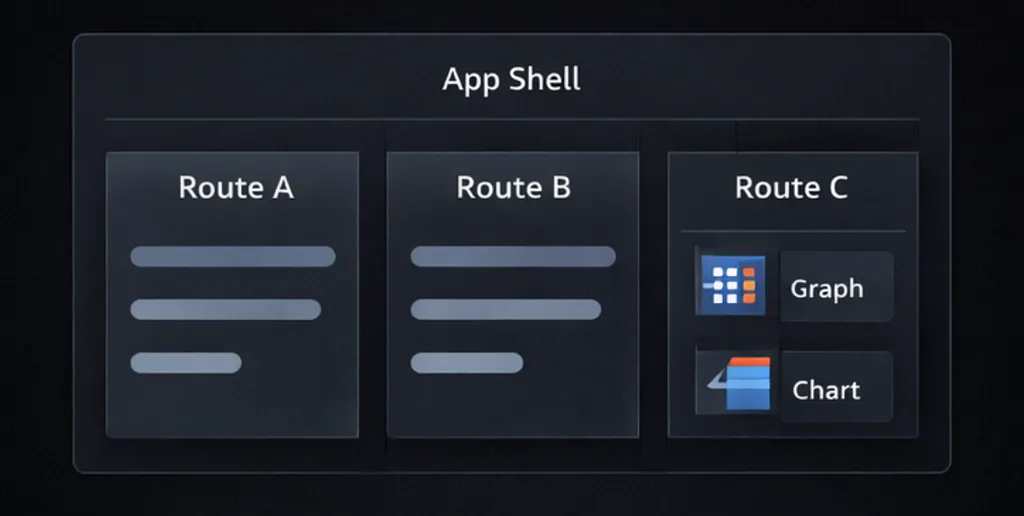
Route and domain boundaries help isolate heavy dependencies and align loading cost with actual user intent.
Performance is Also About Rendering Discipline
Once a screen loads, rendering behavior becomes the next major factor.
This is where teams often reach too quickly for memoization without first asking whether the component model itself is clean. In my experience, the best rendering performance improvements usually come from architectural clarity before they come from tactical hooks.
A few patterns consistently help:
- Keep shared components presentational
- Avoid passing unstable objects or callbacks unnecessarily
- Split expensive views into meaningful subtrees
- Isolate frequently changing state from broad UI trees
- Virtualize long lists and dense tables
- Avoid coupling large screens to global state changes if local state is enough
For example, if a filter panel changes on every keystroke, but the entire surrounding page rerenders including charts, tables, and headers, that is rarely a memoization problem alone. That is usually a state placement and component boundary problem.
A healthier pattern is to keep high-frequency state changes closer to the interaction surface:
export function SearchToolbar({ onSearch }: { onSearch: (value: string) => void }) {
  const [value, setValue] = useState('');

  return (
    <Input
      value={value}
      onChange={(e) => setValue(e.target.value)}
      onKeyDown={(e) => {
        if (e.key === 'Enter') onSearch(value);
      }}
      placeholder="Search services, issues, or alerts"
    />
  );
}
This keeps transient typing state local rather than pushing every keystroke through a broader container that might trigger more work than necessary.
Performance often improves when state lives where it changes.
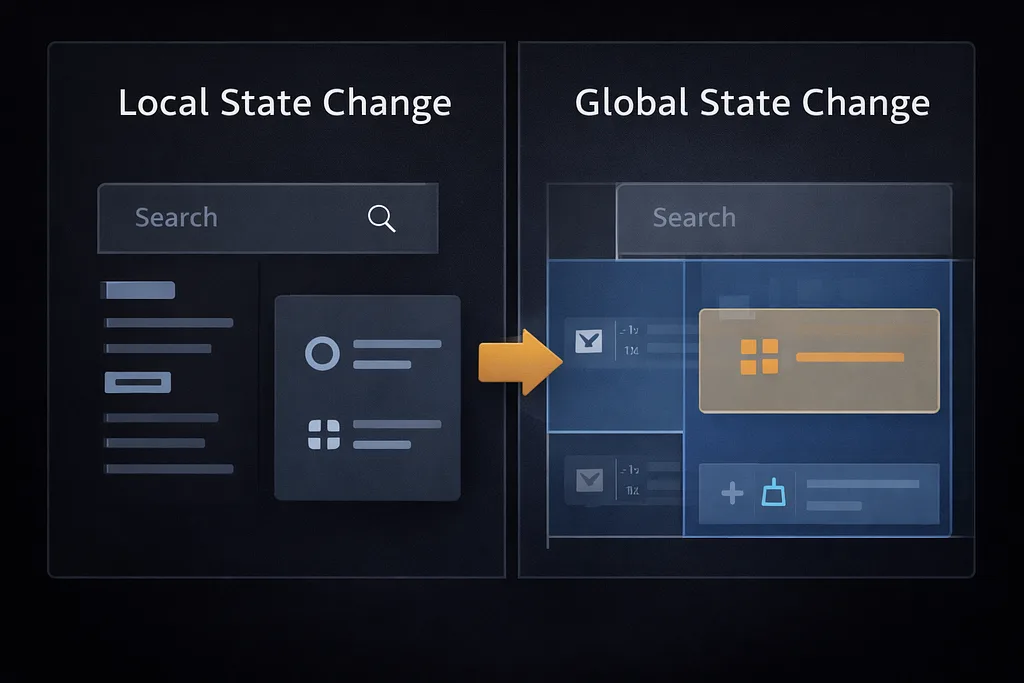
Keeping frequent state changes local helps avoid unnecessary re-renders across the page
Large Data Views Need Explicit Strategies
The moment a product contains large tables, graph views, timelines, or nested panels, performance can no longer be treated casually.
A few examples from modern frontend work:
- Table rows in the hundreds or thousands
- Topology graphs with layered nodes and edges
- Panels with live metrics or status updates
- Markdown or JSON viewers rendering large payloads
- Dashboards with multiple visual surfaces mounted at once
In these cases, good performance usually depends on explicit techniques:
- Virtualization for long lists or tables
- Selective rendering for hidden panels
- Debouncing or batching expensive updates
- Memoized data transformations only where needed
- Worker-based processing for computationally heavy transforms
- Progressive hydration of secondary content
A package list like yours already shows the kind of product surface area where these concerns matter. Libraries such as react-virtuoso, @xyflow/react, elkjs, echarts, and @uiw/react-json-view can be extremely valuable, but they all imply rendering and bundle tradeoffs that should be managed intentionally.
Performance work is not about avoiding powerful tools. It is about ensuring those tools are used where their cost makes sense.
Data Fetching Shapes Perceived Speed
Performance is also deeply tied to data architecture.
A screen may render quickly but still feel slow if:
- Queries are too broad
- Independent data requests are serialized unnecessarily
- Loading states are poorly coordinated
- The UI blocks on secondary data
- Caching strategy is inconsistent
- Refetches cause avoidable visual churn
This is where a well-structured data layer becomes important. Whether a frontend is using GraphQL with Apollo Client, REST with a query layer, or another server-state approach, strong request boundaries and predictable caching behavior make it easier to control what a screen needs and when it needs it.
For example, not every surface should block on the same full payload. A primary summary can often render first, while secondary panels load independently.
export function ConfigurationOverviewPage() {
  const summary = useSummaryQuery();
  const relatedIssues = useRelatedIssuesQuery();

  if (summary.loading) return <PageSkeleton />;

  return (
    <PageLayout>
      <ConfigurationSummaryCard data={summary.data} />
      <RelatedIssuesPanel data={relatedIssues.data} isLoading={relatedIssues.loading} />
    </PageLayout>
  );
}
This kind of decomposition improves perceived speed because the page becomes useful earlier, even if secondary content is still resolving.
Users usually care more about early usefulness than perfect simultaneity.

A page feels faster when primary content becomes useful before secondary data fully resolves
Performance Needs Budgets, Not Just Good Intentions
One challenge with frontend performance is that almost everyone agrees it matters, but very few teams define what “good enough” means in practical terms.
That is why I think performance budgets are helpful. They do not need to be overly formal, but they do need to exist.
Examples might include:
- Route bundle expectations for common screens
- Interaction timing goals for filters and search
- Acceptable thresholds for graph or table mount time
- Limits on loading secondary visualizations eagerly
- Alerting when key workflows regress significantly
Without budgets, performance often becomes a vague aspiration. With budgets, teams can make tradeoffs more explicitly.
Even a lightweight standard helps:
- This route should not pull advanced visualization code upfront
- This interaction should remain responsive during common usage
- This component should not mount hidden heavy children by default
- This dependency should justify its cost
Budgets do not eliminate complexity. They make it easier to manage it honestly.
Performance is a Shared Responsibility
One of the reasons performance deteriorates in growing teams is that no one owns it clearly.
- Sometimes it is treated as a platform concern.
- Sometimes it is treated as a feature-team concern.
- Sometimes it is treated as something QA or RUM dashboards will catch later.
In reality, scalable performance needs shared responsibility with clear roles:
- Design influences visual stability and interaction load
- Frontend architecture influences rendering and loading cost
- Backend or API design influences payload size and request behavior
- Shared component owners influence baseline efficiency
- Product teams influence how many heavy surfaces are combined in one workflow
This is another reason performance belongs inside architecture discussions. It cannot be preserved by one team alone if the structure of the product keeps making expensive patterns easy.

Performance is shaped by design, rendering, data, and architectural boundaries together
What I Have Come to Trust
Across products and teams, a few performance principles have held up for me:
- Performance should be discussed at the architecture level, not only after regressions appear
- Bundle growth is often a signal of boundary problems
- Lazy loading works best when aligned to domain and route boundaries
- Perceived speed matters as much as raw load completion
- High-frequency state changes should stay as local as possible
- Large data surfaces need explicit rendering strategies
- Measure before optimizing, but instrument enough to make measurement useful
- Performance budgets are more effective than vague intentions
- Powerful libraries are fine when their cost matches real user workflows
- A fast-feeling product is part of UX quality, not a separate concern
Final Thoughts
Performance is often treated like a refinement layer added after architecture, product design, and feature work. I think that view is backward.
Performance is one of the clearest ways architecture becomes visible to users.
Users do not see package boundaries, query structure, or component layering directly. But they absolutely feel the result of those decisions when they search, navigate, expand panels, inspect graphs, or wait for screens to stabilize.
That is why scalable frontend architecture should make performance easier to preserve. It should create boundaries that limit bundle growth, state models that reduce unnecessary work, data flows that support progressive usefulness, and UI patterns that remain responsive under real product conditions.
A system that scales cleanly in code but feels heavy in practice is not truly scaled yet.
The goal is not to chase perfect scores or premature micro-optimizations.
The goal is to build product architectures that stay fast enough, focused enough, and resilient enough as complexity grows.